Online dental booking system for UK practices
- No password
- Online payment optional
- Your own domain

recorded at 09:40
Do dental practices need an online booking system?
Most modern practices benefit from it, yes — because a huge share of enquiries arrive when reception can't pick up. Every missed call is a patient who may book elsewhere, and with many people already finding it hard to get through to a dentist by phone (as NHS guidance on finding a dentist reflects), that lost enquiry rarely comes back. Online booking gives patients a way to see live availability and reserve a slot themselves, day or night, while your diary stays the single source of truth. A paper daybook can cope at low volume, but it falls apart once several clinicians are running full lists. DentiPoint puts booking, your appointment diary and patient records in one place, so a slot booked online is instantly blocked out for the whole team and never double-sold. See recalls and reminders for how due patients are nudged to book in the first place.
09
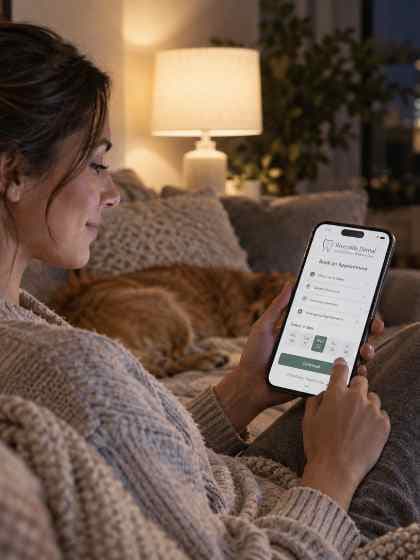
What a patient actually does
Four screens. No account. No hold music.

Picks the treatment
Not a vague '30-minute appointment' — a check-up, a hygiene visit, an emergency. The one they need.Picks a clinician
Only the ones who can perform it. A hygiene appointment never lands on a dentist's list by accident.Picks a time
Only slots that actually fit the treatment's length, respect the turnaround gap, and clear your minimum notice.Says who they are
Returning? Name and date of birth, plus a one-time code. New? Just their details. No password, ever.
A booking page is open at 11pm. Your front desk isn't.
Every appointment booked while the practice is shut is one nobody had to answer the phone for.
The controls you keep
Open booking, without losing the diary.
- Your call: Auto-confirm, or approve first
Some practices want a booking to land straight in the diary. Others want the front desk to eyeball it first. Both are a setting, not a compromise — hold it as a request and confirm it when you're happy.
- Choose what's bookable
A check-up, yes. An implant consult, probably not. Per treatment.
- Minimum notice
Stop someone booking a filling for twenty minutes' time.
- Daily caps
Hold emergencies or banded work to a set number per day.
- Pay up front
Ask for payment at booking on the treatments where a no-show really hurts.
01Booking, handled
Real-time slots, built into your diary
Availability comes straight from your live diary, so patients only ever see slots you can actually offer. A booking made online appears instantly for the whole team, with the patient's details captured up front. Want patients to come back on schedule? Pair booking with recalls and reminders so due patients are prompted to rebook.
- Live availability drawn from your <a href='/scheduling'>appointment diary</a>
- Bookings and enquiries captured against each patient
- A booking-ready page on your own <a href='/websites'>practice website</a>
- Recalls that bring patients back to <a href='/reminders'>rebook</a>
Treatment
October 2026
Wed 14 Oct · Dr A. Patel
What a dental booking system does for your practice
- 24/7 self-servicePatients book whenever suits them, not just in surgery hours.
- Real-time availabilitySlots come from your live diary, so nothing is ever double-booked.
- Fewer phone callsRoutine bookings handle themselves, freeing reception for patient care.
- Every enquiry capturedNew-patient requests and details land in one place, ready to confirm.
Beyond booking: records and recalls in one place
Filling the book is only half the job. DentiPoint keeps every booking tied to a complete patient record — contact details, visit history and notes — so the whole team sees the same picture. And because due patients don't always remember to rebook, automated recalls and reminders prompt them at the right time, turning check-ups and hygiene visits into repeat bookings rather than gaps in the book.
It's one connected workflow: patients book online, the diary updates for the whole team, records stay current, and recalls bring people back. Reminders go by email, SMS or WhatsApp.
Booking on your practice website
Patients book on your DentiPoint booking page. If DentiPoint hosts your practice website, the booking page is already part of it. If you keep the website you have, point its Book button at your booking page, so patients go from your site straight into a slot in your diary.
A dental group gets a booking page per practice, each drawing on that practice's own diary. Existing patients can cancel from their patient portal rather than simply not turning up. To weigh online booking against whole systems, read our guide to the best dental practice software.
More on booking, reminders and DNAs
- Dental Appointment Reminders: When to Send Them
When to send dental appointment reminders and recall notices, what to include, and how to keep them reliable without reception chasing. A UK practice guide.
- Dental No-Show Policy: Cut DNAs and Late Cancellations
How to set a dental no-show and late cancellation policy patients accept, with the reminders and rescheduling that back it up. A UK guide to chair time.
- How to Reduce DNAs in a Dental Practice (UK Guide)
Seven ways to reduce dental DNAs and no-shows: reminders, easy rebooking, short-notice lists, the NHS Failed to Return rules and private payment at booking.
- How to Increase Online Dental Booking Conversions
Practical CRO tactics to increase online dental booking conversions: cut form fields, add trust badges, mobile sticky CTAs and true 24/7 booking.
- Out of Hours Dental Enquiries: Handle Them Online
A practical guide to handling out of hours dental enquiries online, with triage, safety-netting and diary tips that turn missed calls into booked patients.
11
Dental booking system FAQs
Do patients have to create an account?
No. A returning patient gives their name and date of birth and confirms a one-time code. There is no password to forget and no account to abandon halfway.
Can I stop them booking the wrong thing?
Yes — bookability is per treatment. Most practices open up check-ups and hygiene and keep the complex work behind an enquiry.
What stops the diary being flooded?
Minimum notice, daily caps per treatment, and request-to-book if you want the last word. The slots simply stop being offered.
Can patients book appointments outside surgery hours?
Yes. Online booking is available 24/7, so patients can reserve a slot whenever suits them. Every booking writes straight into your live diary, ready for the team the next morning.
Will online booking cause double-bookings?
No. Availability comes from your live appointment diary, so a slot booked online is instantly blocked out for the whole team. Patients only ever see times you can genuinely offer.
Does it work with my practice website?
Yes. If DentiPoint hosts your practice website, booking is built into it, on your own domain. If you keep your existing website, link its Book button to your DentiPoint booking page. See practice websites.
Does online booking take card payments?
Yes. Each treatment can be paid at the practice, paid online as an option, or paid up front by card when the patient books, and the payment counts against the final bill. See payments.
More on online booking
- Automating the Front Desk: How AI and Automation Are Changing Dental Practice Admin
A clear-eyed guide to dental practice automation for UK owners: what automation and AI actually do at the front desk (reminders, recalls, booking, payments, reporting), what they cannot do, and where a person still has to make the call.
- How to Increase Online Booking Conversions on a Dental Website
A practical CRO checklist for UK dental practices: cut booking form fields, add GDC and CQC trust signals above the fold, design a mobile sticky CTA and offer real 24/7 online booking to turn more website visitors into confirmed appointments.