



DentiPoint

Software for dental practices

Cloud dental software for UK practices

Your chairs are full. Your diary isn't. DentiPoint is dental practice management software that runs a UK practice end to end: NHS, private and plan patients in one diary and one price list, online booking a patient can use without picking up the phone, and charting, recalls and payments in the same login.
  • NHS · private · plan
  • 30-day free trial
  • Set up yourself, no consultant

Can one dental software handle NHS, private and plan patients?

Yes. DentiPoint marks every treatment as NHS, private, plan or free, prices it at the moment it is booked, and keeps that funding route attached all the way to the payment, so a mixed practice runs one diary instead of three sets of books.

NHS dentistry in England is charged in three bands plus an urgent band, and DentiPoint prices NHS treatments from a band rate table you control for your region. The price is snapshotted when the appointment is booked, so putting your private fees up next month never rewrites what an existing booking costs.

Funding routeHow DentiPoint prices itWhat the patient pays at the appointment
NHSThe band charge from your regional rate table (Band 1, 2, 3 or urgent)The band charge, unless an exemption is recorded on their record
PrivateYour own fee for the treatmentYour fee
PlanCovered by the patient's membership planNothing extra; the plan fee is collected by your plan provider
FreeA £0 treatment, such as a free consultationNothing

What does DentiPoint do for a UK practice?

It runs the diary, the patient record and the money in one system: booking and reminders, clinical charting, treatment plans, payments and reporting. It does not replace the NHS's own systems, so FP17 claims still go to NHS Dental Services through your existing route, and DentiPoint does not submit them.

Practices can submit FP17 forms using Compass, the NHSBSA's own system, whatever else they use day to day. For the whole system, feature by feature, see dental practice management software.

Does it include dental charting software?

Yes. DentiPoint charts all 52 teeth in FDI or Palmer notation, records BPE screening with excluded sextants, and never overwrites a chart entry: a correction is a new entry with its reason attached.

The British Society of Periodontology describes the BPE as a simple and rapid screening tool that indicates how much further examination a patient needs, and DentiPoint records it the same way, sextant by sextant. See the full dental charting software page.

Is it cloud or on-premise dental software?

Cloud. DentiPoint runs in the browser, so there is no server in the practice to install, patch or keep running.

If you are weighing up a move off a server-based system, read cloud vs server dental software first.

Every empty chair costs an hour.

Where a practice quietly loses chair time

Not in the big things. In the small ones that repeat every single day.

  • The slot nobody refilled

    A cancellation two days out is still a sellable chair-hour — but only if someone notices in time. Payment up front on the treatments you choose, reminders that actually arrive, and a booking page that's open at 10pm put that hour back in front of patients instead of leaving it dark.

  • The treatment booked at the wrong length

    Twenty minutes against a forty-minute filling and the rest of the list runs late. In DentiPoint every treatment carries its own duration and its own clinician type, so the diary offers the right window instead of a guess.

  • The day that filled up with the wrong work

    Emergencies and banded NHS work will eat a list if nothing bounds them. Daily caps hold any treatment to a set number per day across the practice, and a clinician's online availability can be capped too. Once a cap is met, the slots simply stop being offered.

Fewer empty chairs, less phone tag.

01Online booking

A dental booking system that doesn't need a phone call

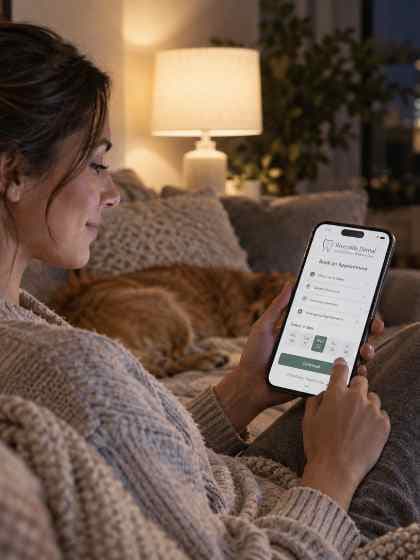
It should let a patient pick the treatment first, then the clinician and the time, so every booking lands at the right length with someone qualified to do it. DentiPoint's online booking does that on your own branded site, recognises returning patients by name and date of birth with a one-time code, and can ask for payment up front on the treatments you choose.

  • FITPatients choose treatment, then clinician, then time — on your own branded site
  • RETURNReturning patients are recognised by name and date of birth. No password to forget
  • CONFIRMConfirm instantly, or hold it as a request for the front desk to approve — your call
  • PAYAsk for payment up front on the treatments you choose, and the booking is held until it's paid
See online booking
A patient booking a dental appointment on her phone at home
Booked from the sofa

See the gap before it costs you.

02The book

A diary that knows a scale-and-polish isn't a root canal

Pick the treatment and the diary does the rest: the right length, on a clinician who is actually allowed to perform it, in a window that respects turnaround time and your minimum notice.

  • CHAIRSDentist, hygienist and therapist lists side by side
  • HOURSWorking hours, breaks and away-days respected — no more double-booked Tuesdays
  • GAPA turnaround gap padded around every appointment, so back-to-back never means back-to-back
  • MOVEMove an appointment and the patient is told, with reminders moved to match
See the diary

Every tooth, every visit, on record.

03Charting

Chart every tooth by its FDI number.

A full odontogram, BPE by sextant and six-point pocket depths, recorded as you go, shown in FDI or Palmer notation. Every entry is kept: a correction supersedes, it never overwrites.

Plans that get booked, not forgotten.

04Treatment plans

A plan the patient can follow, stitch by stitch.

Start from a template, price each line as private, plan or a public scheme such as NHS bands, and book every stage straight from the plan. Patients see the same plan in their portal.

  1. Done

    Examination and BPE

    Dr A. Patel · 20 min

  2. Booked · 21 Oct

    Scale and polish

    Hygienist · 30 min

  3. To book

    Composite filling, 36

    Private · 40 min

  4. Recall · Apr 2027

    Check-up

    Six-month recall, booked by reminder

TemplatesNew patient examHygiene coursePrivate compositeCrown and post

Fewer no-shows, fewer phone calls.

05Patients and funding

Reminders that arrive. A portal that answers.

Patient portal and reminders

Fewer missed appointments, fewer calls.

Reminders go out before every appointment and every recall. Patients sign in to see what is booked, rearrange within your rules and fill in forms before they arrive.

Two dental receptionists greeting a patient at the front desk

Private, plans and public schemes

Every way your patients pay, in one diary.

Each appointment carries how it is funded, so the right price and band follow it from booking to payment.

Private

Your own price list, per treatment and per practice.

Plan

Membership patients charged what they agreed, with the list price kept beside it.

Public

Public schemes too, for example NHS courses of treatment priced by band, with exemptions recorded.

One price list. Three ways to pay.

06Funding

NHS, private and plan dental software: one diary, one price list

The three ways a UK practice gets paid behave nothing alike, which is why most software quietly makes you keep three sets of books. DentiPoint prices the treatment at the moment it's booked and keeps the funding route attached to it, all the way through to the payment.

  • NHSNHS Band 1, 2 and 3 charges from a rate table you control, per region
  • PRIVATEPrivate fees set per treatment, in your own price list
  • PLANMembership plans and £0 consultations handled as first-class funding routes, not workarounds
  • PRICEThe price is snapshotted at booking — putting your fees up next month never rewrites what a patient was quoted
See the treatment catalogue

Yours, live, day one.

07Your website

Your own practice website — without running a website

Every practice gets its own website the day it signs up: your name, your branding, your treatments and your booking page, already wired together. We build it, host it and keep it fast and secure — you never have to manage a website.

  • DOMAINPublish it when you're ready, then point your own domain at it
  • EDITChange the words and photos whenever you like; leave everything else to us
  • PAGESOnline booking, treatment pages and your team's profiles are already on it
  • HOSTINGHosting and updates handled — nothing to install or maintain
See what your site includes

One surgery or thirty.

08Groups

Built for one surgery. Ready for thirty.

Multi-site isn't an add-on bolted to the side. Each branch runs as its own practice, and head office decides how much rope it gets.

  • BRANCHEvery branch has its own booking page, its own diary and its own team
  • GROUPOne roll-up view of the whole group for head office
  • RULESChoose, per branch, what it may change for itself — and what it inherits
  • BOOKPatients book the branch they actually attend, not a central switchboard
Software for dental groups

The short version

funding routes in one price list
4funding routes in one price list
passwords for a patient to forget
0passwords for a patient to forget
your booking page is open
24/7your booking page is open
free trial on every plan
30 daysfree trial on every plan

The unglamorous half, handled.

And the rest of the practice

The unglamorous half that still has to happen every week.

  • A website patients can actually book on

    A branded site with your treatments, your team and your booking page — edited by you, not by an agency.

  • Reminders that arrive

    Email, SMS and WhatsApp reminders before the appointment, so fewer people simply forget.

  • Patient records

    Contact details, consent, notes and appointment history in one record, not four.

  • Dental charting and BPE

    Chart teeth and surfaces, record a BPE and keep every correction on the record, next to the patient's notes.

  • Treatment plans

    Put the options side by side, with NHS band and private lines in the same plan, and see where each plan stands from offered to completed.

  • Enquiries and CRM

    New-patient enquiries from your website arrive in one list. Turn one into a patient record, then book them in.

  • Payments and refunds

    Online card payments and pay links through Stripe, desk payments recorded, balances and refunds, with a full history against the appointment.

  • Expenses and P&L

    Log practice costs as you go and see the tax-year picture without a shoebox.

  • Works on the phone

    The diary, the day list and the patient record on whatever's in your pocket between patients, and a portal for your patients too.

Taking bookings by this evening.

09Getting started

Live in four steps

Four steps you can do yourself. No consultant needed.

90minutes, start to first booking

A practice manager setting up the diary on a laptop
  1. Add your treatments

    Start from a standard UK dental list — check-up, hygiene, filling, extraction, emergency — then set your own durations and prices.
    10MIN
  2. Add your clinicians

    Working hours, breaks, and which treatments each one performs.
    20MIN
  3. Turn on online booking

    Decide what patients may book themselves, whether it auto-confirms, and which treatments are paid up front.
    30MIN
  4. Send them the link

    Publish your booking page and share the link. The diary starts filling itself.
    30MIN

Your whole team, one practice price.

10Pricing

Simple, transparent pricing

One price per practice. Every feature included. Cancel whenever you like.

Price in
Recommended

Single Practice

For a dental practice running a single location, with a full team.

Up to 1 practice

£49.99/ month

Billed monthly · Free for 30 days

Start free trial
  • One practice location
  • Unlimited clinicians
  • Up to 10 team logins
  • Unlimited patients
  • Online booking & diary
  • Recurring & recall bookings
  • Complete patient records
  • Automated recalls & reminders
  • Digital intake & consent forms
  • Patient portal access
  • Your own practice website — built and managed for you
  • Use your own domain: just point it at us

Multiple Practices

For a group running several practice locations. Billed per active practice.

Priced per practice

£44.99/ practice / month

£44.99 × 1 practice = £44.99 a month · Free for 30 days

Start free trial
  • Everything in Single Practice
  • Unlimited practice locations
  • Unlimited clinicians, patients & logins
  • Per-practice diaries & teams
  • Shared or per-practice patient records
  • Group-wide reports & insights
  • Branch-scoped roles & permissions
  • One bill, priced per active practice
  • Priority support

Shown in pounds for the UK and US dollars everywhere else. You are billed in the currency for your country.

Straight answers before you sign up.

11FAQ

Questions practices actually ask

How do I choose the best dental software in the UK?

Start from how your practice is paid: if you see NHS, private and plan patients, check that one diary and one price list handle all of them without workarounds. Then check online booking, charting, published pricing and a trial you can run on your own data, and see our guide to the best dental practice software for UK practices and the side-by-side comparisons.

How much does dental software cost?

Ask each supplier what the price is per: practice, surgery or clinician, because that decides what you pay as the practice grows. DentiPoint publishes one price per practice on its pricing page, and every plan starts with a 30-day free trial.

Is there free dental software?

DentiPoint isn't free: every plan has a 30-day free trial, and a card is taken when you start. If you are comparing it with a free tool, check whether that tool handles NHS bands, charting and online booking before you move patient records into it.

Can patients book without creating an account?

Yes. A returning patient is recognised by name and date of birth with a one-time code — no password. New patients simply give their details as they book.

Can patients pay when they book, to cut no-shows?

Yes. Each treatment is set to pay at the practice, offer online payment, or pay up front by card when the patient books, and whatever is paid counts against the final bill. Pair them with appointment reminders and automatic patient recalls.

We're a group with several practices. Does that work?

That's a first-class case, not an afterthought. Each branch has its own booking page, diary and team; head office gets a roll-up view and decides what each branch may change for itself.

How long does setup take?

It depends on how many treatments, clinicians and patients you add. The steps are simple: add your treatments, add your clinicians and their hours, then switch on online booking. There is no consultant to book. Coming off paper or a spreadsheet? See going paperless with dental records and dental software vs spreadsheets.

Back on recall, back in the chair.

12Get started

Stop losing chair time to admin

Set up your treatments and let online booking fill the diary.

A dental practice team smiling at reception